Rent Windows VPS/VDS
ROBOVPS offer virtual servers on Windows in Germany, Netherlands, Finland and Russia. Each plan included unmetered traffic.
ROBOVPS offer virtual servers on Windows in Germany, Netherlands, Finland and Russia. Each plan included unmetered traffic.
Your VPS always enabled and connected to the Internet. You can connect to Windows VPS by using standard RDP client. Windows VPS can be used for running any program: SEO, Forex, CRM, etc.
To connect to Windows dedicated server from your Windows PC, click on "Run" and in Software list choose "Standard - Remote Desktop connection". Standard RDP client window would be open. You can create shortcut for RDP client connection for easy access.
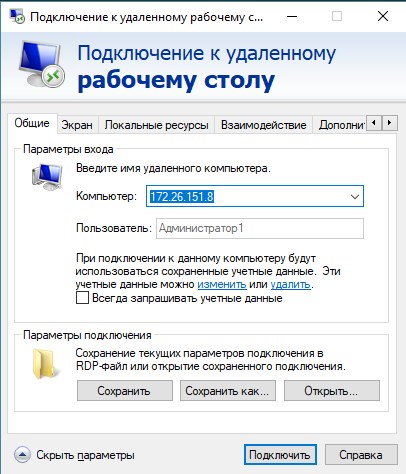
In this window fill out your server ip address in field "Host" and user name (usually it is Administrator). You can obtain connection login and password from welcome message or from your account at customer portal. Then click on button "Connect" and you will connect to server.
When you successfully connected to server new window will open with remote desktop. Now you could work on remote server as on your own PC.
If you want migrate data from/to your server or copy & past your data from your PC you need connect your local resources (disk, usb device, printer, sound, etc.):
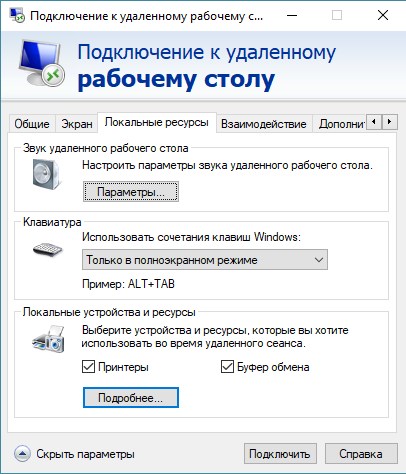
If you click on "More" you will see local resources of your PC like disks, USB devices and if you mark them, they will available on your remote server too.
Note: your server work always even when you sleep and disconnected. You just connect to server anytime when you want and continue your work, runned software can work at background if you click logout.
Linux - https://www.freerdp.com/
macOS - https://apps.apple.com/ru/app/microsoft-remote-desktop/id1295203466?mt=12
Android - https://play.google.com/store/apps/details?id=com.microsoft.rdc.android&hl=ru
iOS - https://itunes.apple.com/us/app/microsoft-remote-desktop/id715768417?mt=12